APK PlayStudio 中文 Try free for 7 days

Android games,
native on Apple silicon.

APK PlayStudio runs Android natively on your Mac, so game code never has to be translated into another instruction set. Your keyboard, mouse and gamepad become fingers on a touchscreen, at up to 144 fps.

Coming soon to the Mac App Store

Free to download, with every feature unlocked for the first 7 days. Requires a Mac with Apple silicon (M1 or later) and macOS 13 or later.

The APK PlayStudio emulator window running an action game, with the battle filling the window

Try it with your own keyboard: press W A S D, J, U, I, Q, F or M.Tap a key on the screen to try it.

In APK PlayStudio, every key press is a touch on the screen.

No translation. That's why it's fast.

Apple silicon and phone chips speak the same instruction set. APK PlayStudio uses the virtualization built into macOS to boot ARM64 Android directly, so games run their own code as is, with no layer translating it for another architecture.

Graphics are rendered with Metal, with OpenGL ES 3.2 support. An idle emulator barely touches the CPU, and memory it isn't using goes back to your Mac.

9%
of one core used by the engine while sitting on the Android home screen
½ core
engine overhead in a game's main city
5.2 GB
steady memory use of a 4 GB emulator in a game, down from a 7.4 GB peak after unused memory is returned

Measured on our M5 Max. Results vary by Mac and game.
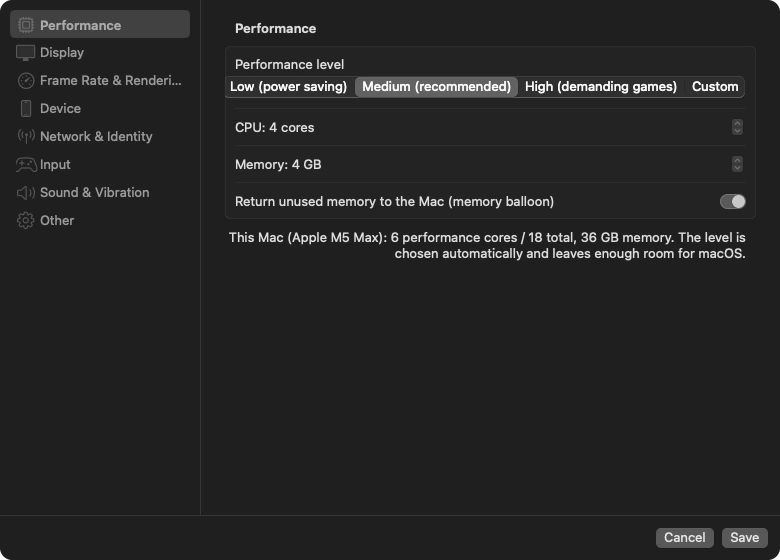
Performance settings: low, medium, high and custom levels, CPU cores, memory, and returning unused memory to the Mac. The level is chosen automatically for this Mac
The performance level is picked for your Mac, leaving enough room for macOS.

Keyboard, mouse, gamepad.
They're all your fingers.

Click the screen to add a key and drag it where you want to touch. Seven kinds of controls cover what mobile games ask of you:

Tap
Press to touch, release to lift. Hold for a long press
Rapid tap
Taps repeatedly at a set interval while held
Auto tap
Press once to start, again to stop
Joystick
Move with W A S D or the left stick
Swipe
One key draws a preset path
Camera
Lock the mouse and move it to turn the view, or use the right stick
Aimed skill
Hold the skill key, aim with the mouse or stick, release to cast
  • One set per game. Open a game and its controls load automatically. Back on the home screen, every mapping turns off and keys type normally.
  • Use what others have tuned. Mappings shared by other players are ranked by how many people use them. Apply one with a click.
  • Plug in a gamepad and play. Xbox, PlayStation and Switch Pro controllers all work. Touch the gamepad to switch to its mapping, press a key to switch back.
  • Out of the way when you chat. Click a text field in a game and the mapping pauses so you can type with your Mac's input methods.

Even the mouse pointer looks the part.

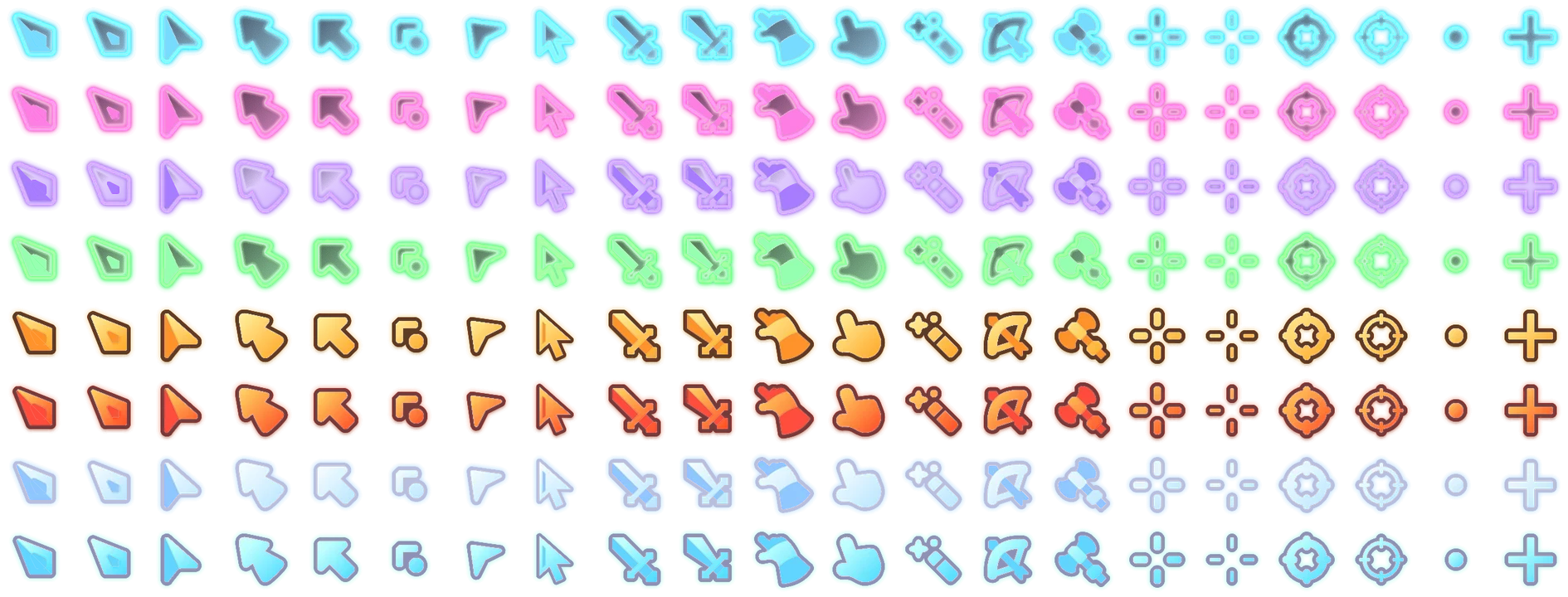
Move the mouse over the emulator and the pointer turns into the one you picked: 21 shapes, 8 colors, 3 sizes. You can also use your own .cur, .ani or image file.

Try one in this area:
All 21 pointer shapes in 8 colors (neon cyan, neon pink, neon purple, neon green, molten gold, fire, ice white and teal), including arrows, swords, gauntlets, wands, bows, battle axes, crosshairs and scopes

Built to the spec of a real phone.

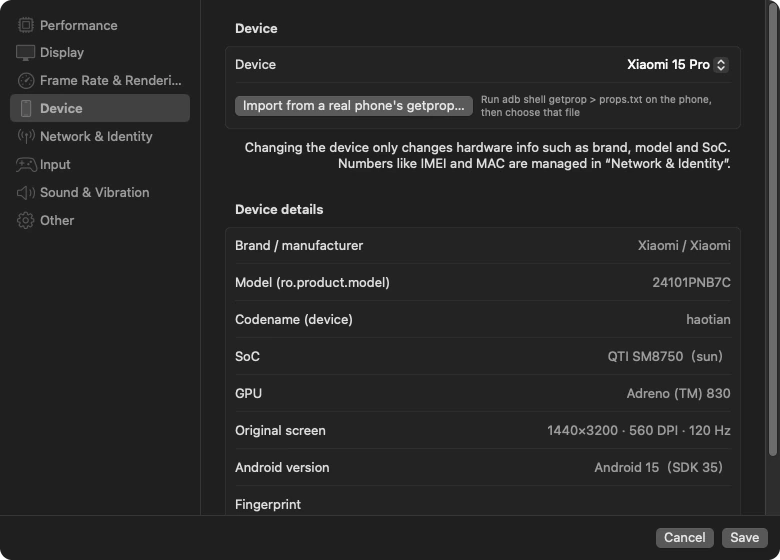
33 built-in device profiles, from Xiaomi, Redmi, Samsung, Huawei, Honor, OPPO, OnePlus, vivo and iQOO to REDMAGIC, ROG, Pixel and a few tablets. Pick one and the resolution, aspect ratio and DPI match that phone, so game layouts and key positions match too.

Games see a flagship phone and give you the graphics to match. In one game we tested, the render resolution went from 1600×720 to 2000×900, and the frame cap in the main city went from 30 to 60.

  • Up to 144 fps, following your display's refresh rate.
  • Frame generation. A game stuck at 30 fps gets a frame inserted between each pair, so it looks close to 60.
  • Sharp when enlarged. When the window is bigger than the game, MetalFX upscales to the window's real pixels.
Device settings: Xiaomi 15 Pro selected, with brand, model, SoC, GPU, original screen and Android version listed, plus importing a real phone's properties
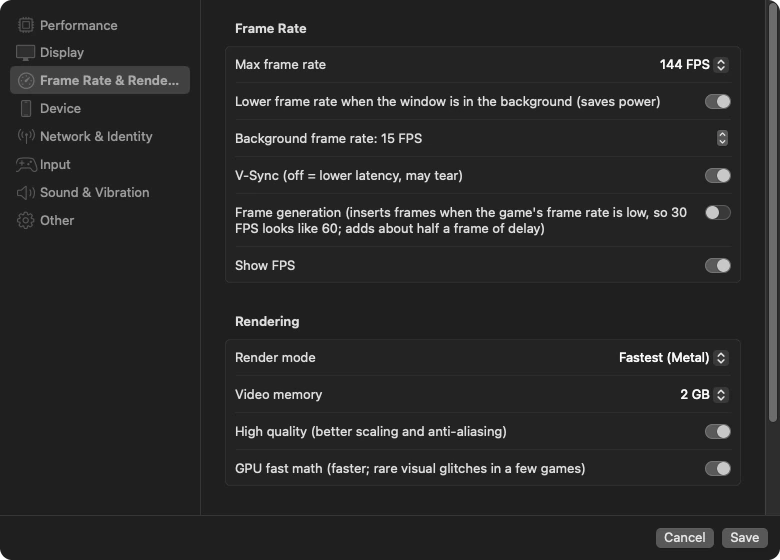
Frame rate and rendering settings: max frame rate 144 fps, lower frame rate in the background, V-Sync, frame generation, show FPS, render mode Fastest (Metal), 2 GB video memory, high quality

One emulator per account, each on its own.

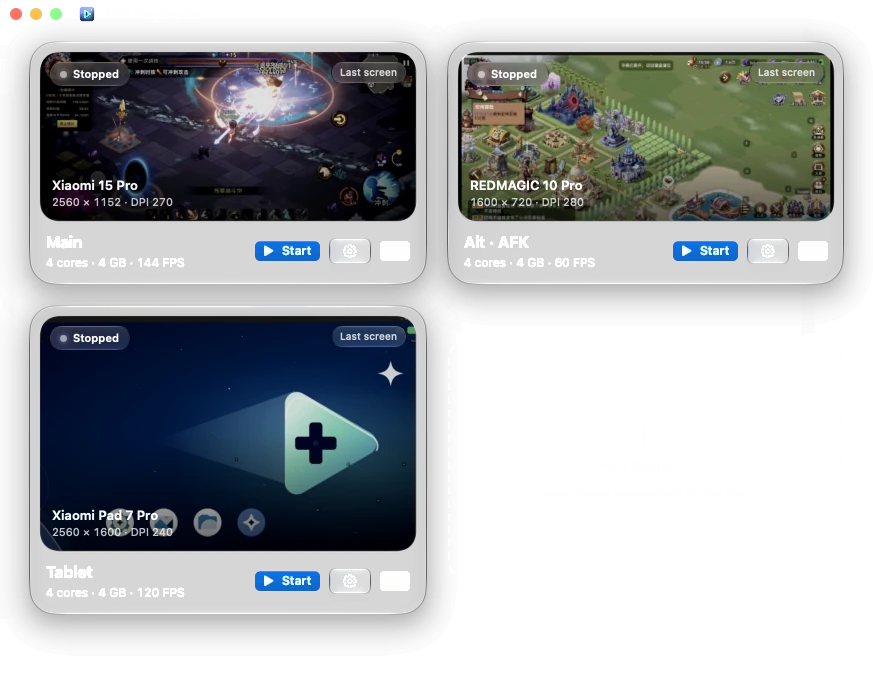
Create, duplicate and delete as many as you like. Every emulator is a separate process with its own device, resolution and controls, so if one gets stuck it doesn't drag the others down.

The instance manager with three emulators: Main (Xiaomi 15 Pro, 144 fps), Alt · AFK (REDMAGIC 10 Pro, 60 fps) and Tablet, each showing its last screen, next to New Emulator

The small things are done too.

  • Drop to install. Drag one or more .apk files onto the emulator. Progress shows at the top, and if something fails you're told why.
  • Clean Android 17. No ads, no preinstalled app store, no system pop-ups at boot, no lock screen, no screen timeout.
  • Shutdown keeps your data. Android goes through its own shutdown and finishes writing before power-off, usually in seven or eight seconds.
  • Faster from the second boot. Graphics shaders are compiled once and saved, cutting boot time from about 27 seconds to about 10.
  • Quiet when minimized. Frame rate drops in the background to save power, and audio can mute when minimized.
  • Rumble on your gamepad. In-game vibration is passed to the controller, with adjustable strength.

Use it for 7 days, then decide.

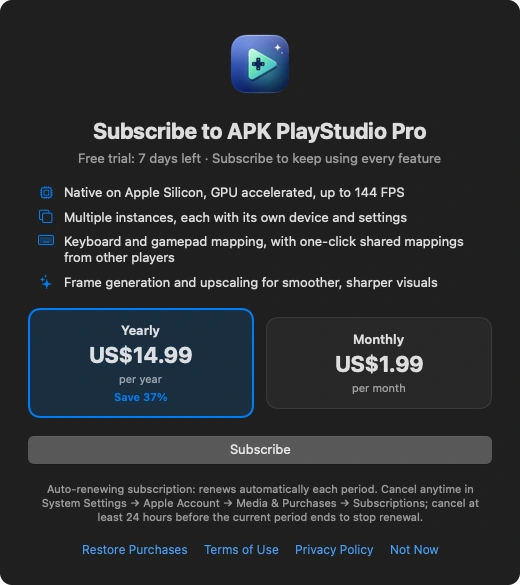
Free to download. For 7 days from your first download, everything is unlocked. After that, subscribe to APK PlayStudio Pro to keep going:

Yearly
$14.99per yearAbout 37% less than monthly. China: ¥98
Monthly
$1.99per monthChina: ¥14

Available only on the Mac App Store. Subscribe with your Apple Account and cancel anytime in System Settings → Apple Account → Media & Purchases → Subscriptions. Prices vary by region; the App Store shows yours.

Coming soon to the Mac App Store
The in-app subscription screen: 7 days of free trial left, yearly and monthly plans, a Subscribe button, and links to restore purchases, terms of use and privacy policy

Questions

Which Macs are supported?

Any Mac with Apple silicon, M1 or later, running macOS 13 or later. Macs with 8 GB of memory start on a lighter level (2 cores, 3 GB). Intel Macs aren't supported.

Which games and apps can I install?

Any Android game or app with a 64-bit (arm64-v8a) build, which covers nearly every current game. Older apps that only ship 32-bit builds won't install, because Apple silicon doesn't support 32-bit ARM.

Where do games come from?

APK PlayStudio doesn't provide or download games. Get the .apk from the game's official site or another source you trust and drag it onto the emulator, or download it with the browser inside the emulator.

Do you collect my data?

Only anonymous usage statistics, such as which games are installed and for how long they're played, app and system versions, and performance data when a game stutters. We use them to improve compatibility and performance. We never collect in-game content, screenshots or anything you type. You can turn off “Send anonymous usage statistics” in Preferences. See the privacy policy.

How do I get help?

Email hon6@foxmail.com with your Mac model, macOS version and the game that's giving you trouble. We'll get back to you as soon as we can.